Last Updated: September 11th, 2026
To do local SEO in Brooklyn, you need to make it easy for Google and nearby customers to understand what you offer, where you work, and why they should choose your business. That starts with a complete Google Business Profile, consistent business information, useful neighborhood pages, relevant local listings, and genuine customer reviews.
Brooklyn is too broad to treat as one market. A business serving Park Slope, Williamsburg, or Bay Ridge needs location signals that reflect the neighborhoods it actually serves. The goal is to build visibility in Google Maps, local organic results, and AI-generated recommendations for high-intent searches such as “Brooklyn plumber” or “electrician in DUMBO.”
This guide walks through seven practical steps for building that visibility. You’ll learn how to optimize your Google Business Profile, strengthen your local listings, target neighborhood-level searches, earn relevant Brooklyn links, and create a review process that supports long-term growth.
Here’s how to do local SEO in Brooklyn in 7 steps:
- Claim and verify your Google Business Profile
- Pick the most specific category and complete every field
- Lock in NAP consistency across every listing
- Build citations on Brooklyn- and NYC-relevant directories
- Target neighborhood-level keywords instead of “Brooklyn” alone
- Earn backlinks and press from Brooklyn outlets and community groups
- Build a system for generating and responding to reviews
By the end of this guide, you’ll know how to get your Brooklyn business showing up in local search, including Google’s Map Pack, organic local rankings, and AI tools that now pull from Google Business Profile data to answer “best plumber near me” style questions. The steps below are ordered by priority: handle the first three before anything else, then layer in the rest.
Step-by-Step: How to Do Local SEO in Brooklyn
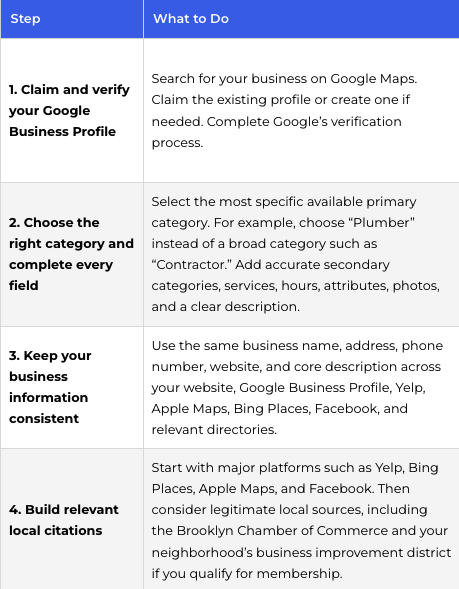
| Step | What to Do | Why It Matters | Difficulty | Timeline |
|---|---|---|---|---|
| 1. Claim and verify your Google Business Profile | Search for your business on Google Maps. Claim the existing profile or create one if needed. Complete Google’s verification process. | A verified profile gives you control over your business information and allows you to manage how your business appears on Google. Verification alone does not guarantee Map Pack rankings. | Low | 1-2 weeks |
| 2. Choose the right category and complete every field | Select the most specific available primary category. For example, choose “Plumber” instead of a broad category such as “Contractor.” Add accurate secondary categories, services, hours, attributes, photos, and a clear description. | Complete information helps Google understand what your business does and which searches may be relevant. Use service fields and your description to mention specialties such as emergency plumbing. | Low | 1 week |
| 3. Keep your business information consistent | Use the same business name, address, phone number, website, and core description across your website, Google Business Profile, Yelp, Apple Maps, Bing Places, Facebook, and relevant directories. | Consistent information helps search platforms connect listings that refer to the same business. It also reduces confusion for potential customers. | Low to medium | 2-3 weeks |
| 4. Build relevant local citations | Start with major platforms such as Yelp, Bing Places, Apple Maps, and Facebook. Then consider legitimate local sources, including the Brooklyn Chamber of Commerce and your neighborhood’s business improvement district if you qualify for membership. | Relevant listings give customers more ways to find you and reinforce your business information across the web. Focus on accuracy and relevance instead of creating profiles on every available directory. | Medium | 4-6 weeks |
| 5. Create useful neighborhood pages | Build a dedicated page only for each neighborhood you genuinely serve. A Park Slope plumbing page should include unique information about that area, your service coverage, common customer needs, and clear next steps. | Neighborhood pages can help you compete for more specific searches, such as “Park Slope plumber” or “Williamsburg electrician.” Thin pages that only swap one neighborhood name for another add little value. | Medium to high | 6-10 weeks |
| 6. Earn relevant Brooklyn links and mentions | Join appropriate local organizations, sponsor a community event, contribute useful advice to a neighborhood publication, or share a customer-focused story with a local reporter. Potential sources may include Brooklyn Paper, Brooklyn Eagle, Greenpointers, Bushwick Daily, chambers, and BIDs. | Links and mentions from relevant local organizations can strengthen your website’s prominence and connect your business to Brooklyn in a way that broad national directories cannot. | Medium | Ongoing |
| 7. Build a review request and response process | Send every customer a direct review link after a completed job. Ask for honest feedback, avoid incentives or review filtering, and respond professionally to both positive and negative reviews. | Recent, genuine reviews help potential customers evaluate your business and contribute to your broader local reputation. Review responses also give you a chance to answer questions and demonstrate customer care. | Low | Ongoing |
Steps 1 through 3 are foundational; get them done in your first few weeks since everything else builds on a complete, verified, and consistent profile. Steps 4 through 6 compound over the following months, and review generation (step 7) should run continuously in the background starting day one. Most Brooklyn small businesses see their first measurable jump in neighborhood-level visibility within 60 to 90 days of completing steps 1 through 4.
Google identifies relevance, distance, and prominence as key parts of local ranking. Complete business information supports relevance, while reviews and links can contribute to prominence. Google also states that profile improvements do not guarantee a specific ranking position.
Common Mistakes to Avoid
Treating “Brooklyn” as your only target
“Brooklyn” is a broad market with strong competition. If your business serves specific neighborhoods, create useful content around those areas instead of relying on one borough-wide page. Examples include “electrician in Bed-Stuy,” “DUMBO electrician,” and “Park Slope plumber.”
Using inconsistent business information
Small differences such as “Ave” versus “Avenue,” an old phone number, or a missing suite number can create conflicting information across your listings. Create one master record for your business details and use it whenever you create or update a profile.
Choosing a category that is too broad
Choose the most specific category available that accurately describes your core business. Use your service fields and website content to explain specialties that may not exist as separate Google categories.
Creating thin neighborhood pages
A page with the same copy repeated for every neighborhood will give customers little useful information. Add real details about the area, explain which services you provide there, and include proof that your business serves that community.
Buying or manipulating reviews
Ask for genuine reviews from real customers after completed work. Avoid buying reviews, offering incentives, or asking only satisfied customers to leave feedback. These practices can violate platform policies and damage customer trust.
Creating duplicate listings
Search your business name and address on Google Maps from time to time. If you find a duplicate profile, follow Google’s process for reporting or merging it instead of creating another listing yourself.
Expecting profile updates to guarantee rankings
A complete profile gives Google better information about your business, but it cannot guarantee a specific Map Pack position. Local visibility also depends on the searcher’s location, the relevance of your profile, competitor strength, reviews, links, and other prominence signals.
What’s Next
Once the seven steps are in place, review your Google Business Profile performance regularly. Look at calls, website visits, direction requests, and the search terms connected to your listing. Pay attention to whether neighborhood names begin appearing alongside searches for your main services.
From there, expand one neighborhood page at a time. Keep your business information accurate, continue earning genuine reviews, and review your citations each quarter. Update pages when your service area, hours, phone number, or core services change.
AI search visibility also depends on the broader information available about your business. Keep your website, Google Business Profile, reviews, directory listings, and local mentions aligned so customers and search platforms receive the same clear description of who you are and where you work.
If you’d rather have this built out for you, reach out here and we’ll map your Brooklyn local SEO strategy neighborhood by neighborhood.